JSON Formatter & Beautifier Online
Format, beautify, and validate JSON with syntax highlighting. Supports large files.
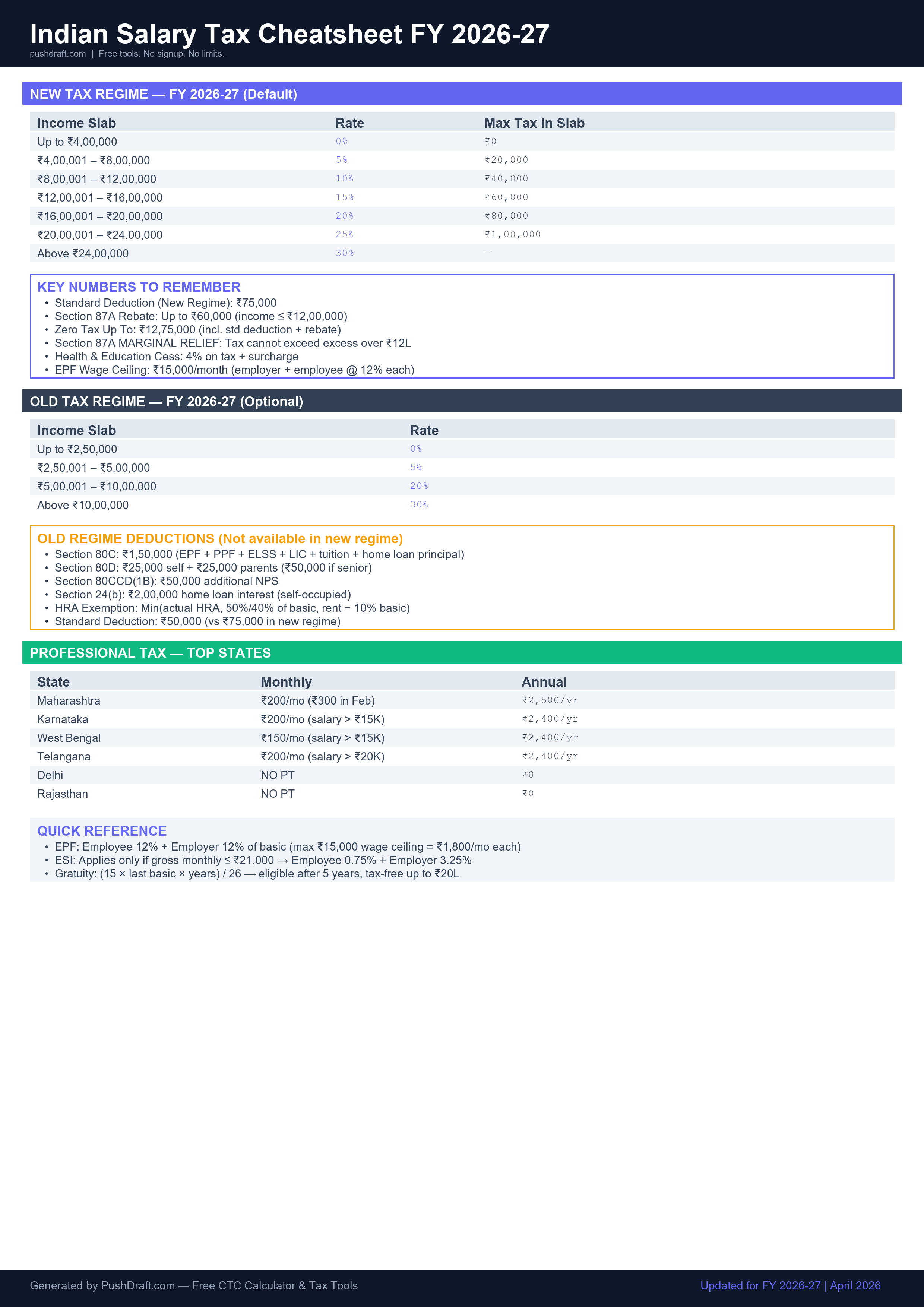
Formatted JSON appears here...Free: Indian Salary Tax Cheatsheet 2026-27
New regime slabs, old regime deductions, PT by state — one page, print-ready.
How to Use JSON Formatter
-
Paste your JSON
Paste raw or minified JSON into the input area.
-
Click Format
Instantly formats with proper indentation and syntax highlighting.
-
Copy the result
Click the copy button to copy formatted JSON to clipboard.
Related Tools
Frequently Asked Questions
What is JSON formatting?
JSON formatting (or beautifying) adds proper indentation, line breaks, and spacing to minified or compressed JSON data, making it human-readable. This tool also validates JSON syntax and highlights errors.
Is my JSON data secure?
Yes. All processing happens entirely in your browser. Your JSON never leaves your device — no data is sent to any server.
PushDraft Weekly
Get weekly developer tips and new tools. Free, no spam, unsubscribe anytime.